Facebook Error Code #1815290: Invalid Objective For Targeting Optimisation
Error message: Invalid objective for targeting optimisation: The campaign objective is not supported by targeting optimisation.

AF
Andrew Firth
Director
·
August 7, 2023
·
5 min read

Error message: Invalid objective for targeting optimisation: The campaign objective is not supported by targeting optimisation.

Are you seeing this new error?
Back in 2020 we helped ad creators deal with a common error message for an ‘invalid optimisation sub event’. But recently a new error message has reared its ugly head…
And in typical Facebook fashion, there’s little help online or within the error message itself to provide a solution and continue with your ad creation.
Luckily we’ve been able to identify a fix - here’s how you can sort it out.

The cause
The main cause of the problem seems to be at the Ad Set level, specifically the audience targeting segment. Due to Facebook’s recent changes to location targeting, this seems to have affected the previous way to fix the #1815290 error.
Facebook has now changed location targeting so that you can only target people currently or recently living in a given area, whereas you used to be able to distinguish residents from travellers (this was the cause of another error we covered, which you can read about here).
*Note: This will only work if you still have the ability to separate residents from travellers on the older version of Facebook Ads Manager, if you’re on the new version then keep following this guide.
The fix
The issue seems to be with old saved audiences that were created prior to this location-setting change made recently by Facebook. So the fix is simple.
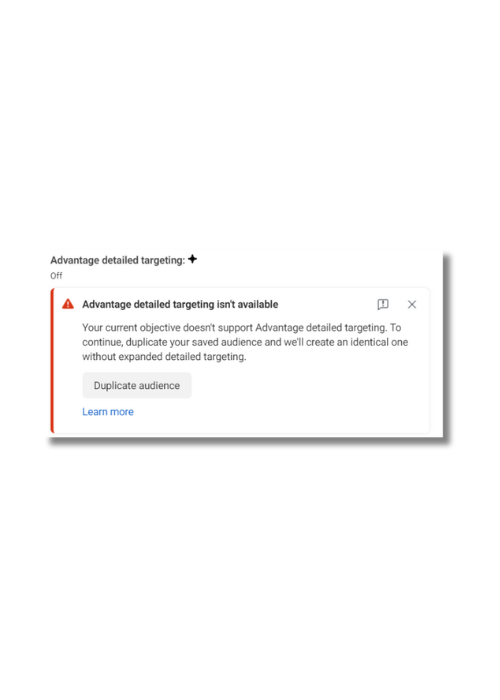
Select your saved audience that is showing the error. You should see a message just below it, like in the screenshot.
As it states in this message, the current audience does not support advantage detailed targeting.
So, duplicating the audience again will remove this preselected targeting option. Simply press the button “Duplicate audience” on that message. Once you’ve done this you should see that pesky error message at the top right disappear.
*Note: We wouldn’t recommend using advantage targeting in any case.
If you have come across any Facebook errors that you just can't find the resolution for, drop us a line and our Facebook Advertising experts will be more than happy to take a look into it for you!
Watch our YouTube video explaining the fix below:
AF
Andrew Firth
Director
Ascensor
Questions this piece answers.
Want a view on your own business? Tell us what you are trying to achieve and we will tell you how we would approach it.
Talk to us
Case studies where this was the work.
Case studies where this was the work. Each card shows the headline result.
All case studies →















Want a specialist's view on your business?
A few details is enough to start. We will reply to say how we would approach it.
Prefer to call? 0113 831 4400
Thanks, we have your enquiry.
One of our specialists will reply to say how we would approach it. Want to talk sooner? Call 0113 831 4400.
More insights.





You don't need to go viral to make money from content
A million followers isn't the goal. Nav on why the right 3,000 followers can outsell 30,000, and why every post is a lottery ticket.
content-and-personal-brand